
看累了听个音乐吧
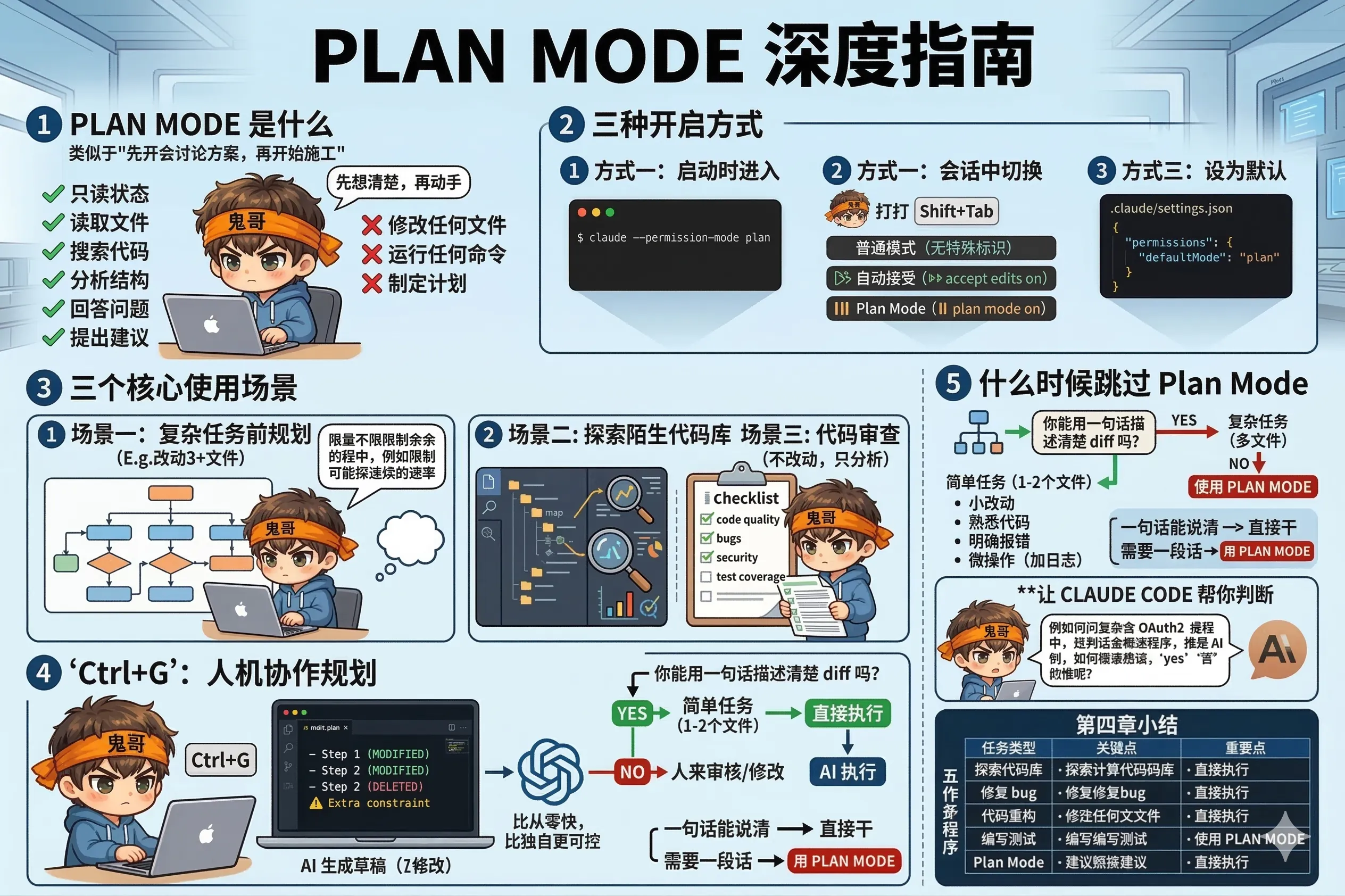
Plan Mode 是 Claude Code 里最容易被忽视的功能之一——很多人装了很久都不知道它的存在。
但一旦你用过,你会发现它对复杂任务来说几乎是必须的。
Plan Mode 下,Claude Code 进入只读状态:
你可以把它理解为"先开会讨论方案,再开始施工"。
方式一:启动时进入
claude --permission-mode plan方式二:会话中切换
在会话里按 Shift+Tab,会在三种模式之间循环:
普通模式 → 自动接受模式 → Plan Mode → 普通模式底部状态栏会显示当前模式:
⏵⏵ accept edits on⏸ plan mode on方式三:设为默认
在 .claude/settings.json 里设置:
{
  "permissions": {
    "defaultMode": "plan"
  }
}
适合谨慎的场景,比如在生产代码库里工作,每次任务都先强制规划。
任何需要改动 3 个以上文件的任务,都建议先进 Plan Mode:
I need to add rate limiting to all API endpoints.
analyze the current routing structure and create a plan:
- which files need to change?
- where should the rate limiting middleware be added?
- how should different endpoints have different limits?
- what's the safest order to make these changes?
拿到计划之后,你来决定是否认可,再切回普通模式执行。
Plan Mode 是安全的探索模式——它只读不写,特别适合刚接手项目的时候:
explore the entire codebase. understand the architecture,
find the key modules, and identify any potential issues.
don't make any changes — just report what you find.
用 Plan Mode 探索,不用担心它"手滑"改了什么。
review the recent changes in git (last 5 commits).
analyze for: code quality issues, potential bugs, security concerns,
and missing test coverage. give me a detailed report.
do not make any changes.Ctrl+G:在编辑器里编辑计划 这是 Plan Mode 里最强大、也最少人知道的功能。
当 Claude Code 生成了一份计划,你在 Plan Mode 下按 Ctrl+G,这份计划会在你的默认编辑器(VS Code、vim、nano……)里打开,你可以直接编辑它。
你可以做的事:
编辑完保存,关掉编辑器,Claude Code 会按照你修改后的计划来执行。
这实际上是一种"人机协作规划"——AI 生成草稿,你来审核和修改,然后 AI 执行。比你从零写计划快,比 AI 独自执行可控。
Plan Mode 有价值,但也有开销——它会增加一轮"先分析再执行"的往返。
可以跳过 Plan Mode 的情况:
一个经验规则: 如果你能用一句话描述清楚要改的 diff,就不需要 Plan Mode。如果你需要一段话才能说清楚,Plan Mode 就值得用。
如果你不确定要不要用 Plan Mode,可以直接问它:
I want to add OAuth2 support to this app. is this complex enough
to warrant using plan mode first, or can we just do it directly?
它会根据任务的复杂度给你建议。
这一章覆盖了日常开发里最常见的五类任务:
| 任务 | 关键点 |
|---|---|
| 探索代码库 | 从宏观到微观,用 @ 聚焦具体文件,最后生成 CLAUDE.md |
| 修复 bug | 给完整上下文(报错+复现步骤+验收标准),改完要 review |
| 代码重构 | 三步走:探索 → 计划(Ctrl+G 编辑)→ 分批执行 |
| 编写测试 | 先找缺口,再生成,再找 edge case,最后审查质量 |
| Plan Mode | 先想清楚再动手,Ctrl+G 让你直接编辑计划 |
下一章,我们来聊怎么把重复的工作打包成命令,一次设置,永久省事。