
看累了听个音乐吧
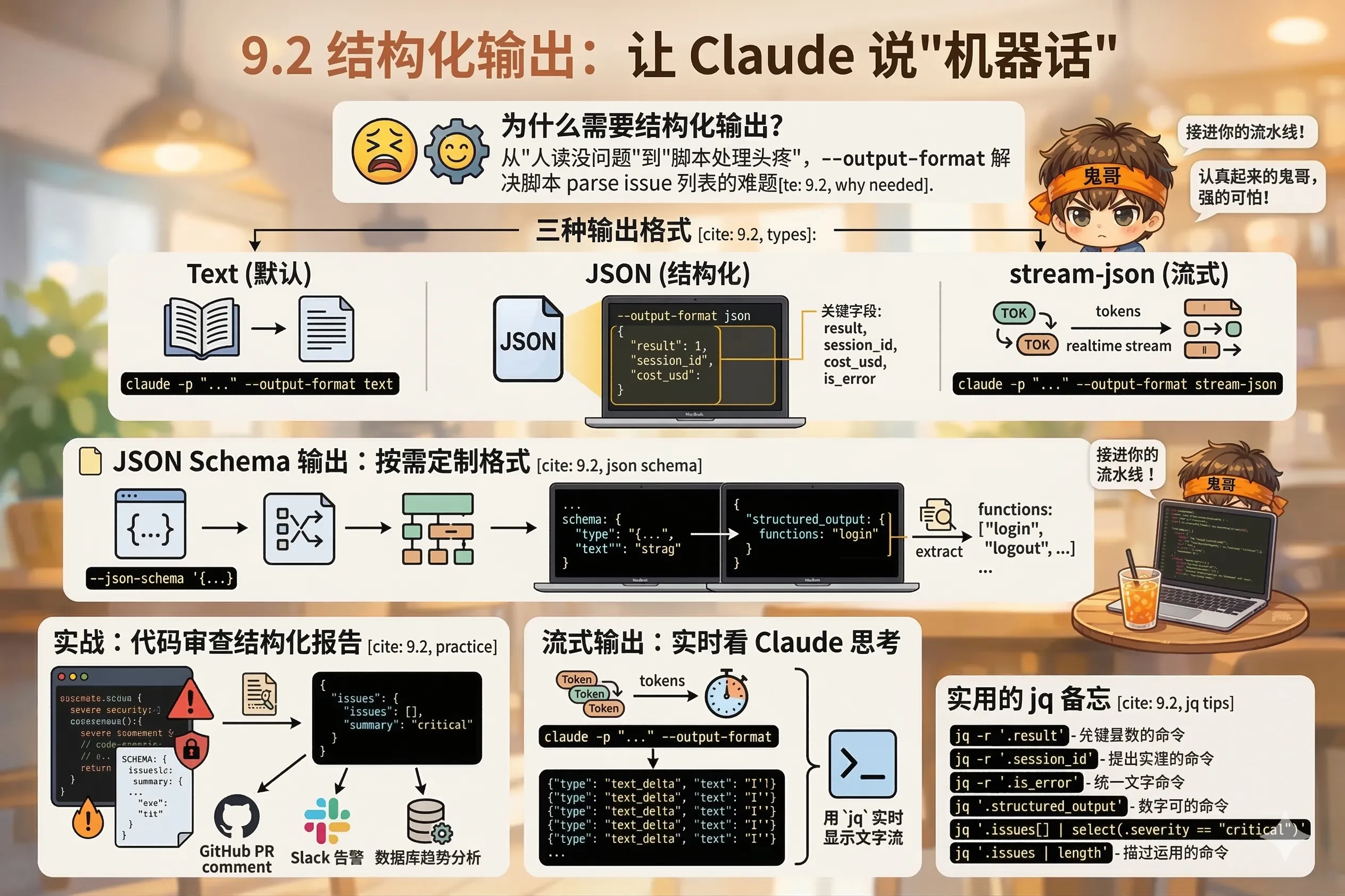
让 Claude 说"人话"之外,还能说"机器话"——输出 JSON,接进你的流水线。
claude -p "Review this file" 默认返回的是自然语言文本——人读没问题,但脚本处理就头疼了。你不知道哪里是"严重问题",哪里是"建议",更没法直接 parse 出 issue 列表。
--output-format 解决这个问题。
# 默认:纯文本
claude -p "Summarize the project" --output-format text

# JSON:带元数据的结构化响应
claude -p "Summarize the project" --output-format json

# stream-json:实时流式 JSON(逐 token 输出)
claude -p "Summarize the project" --output-format stream-json
--output-format json 的响应结构 {
"result": "This is a Node.js web application using Express...",
"session_id": "sess_abc123def456",
"cost_usd": 0.0032,
"duration_ms": 4200,
"num_turns": 2,
"is_error": false
}关键字段:
result:Claude 的回答(纯文本)session_id:会话 ID,可用于 --resume 续接cost_usd:这次调用的费用(排查超支很有用)is_error:是否出错jq 提取字段 # 只要结果文本
claude -p "What is the main function of auth.js?" \
--allowedTools "Read" \
--output-format json | jq -r '.result'
# 拿到 session_id 备用
SESSION=$(claude -p "Review the codebase" \
--output-format json | jq -r '.session_id')
# 检查是否出错
RESPONSE=$(claude -p "Run tests" --allowedTools "Bash" --output-format json)
if [ "$(echo "$RESPONSE" | jq -r '.is_error')" = "true" ]; then
echo "Claude encountered an error"
exit 1
fi最强大的功能:用 --json-schema 强制 Claude 按指定结构输出,结果放在 structured_output 字段里。
claude -p "Extract the main function names from src/auth.js" \
  --allowedTools "Read" \
  --output-format json \
  --json-schema '{
    "type": "object",
    "properties": {
      "functions": {
        "type": "array",
        "items": { "type": "string" }
      }
    },
    "required": ["functions"]
  }'
响应:
{
  "result": "...",
  "structured_output": {
    "functions": ["login", "logout", "verifyToken", "refreshToken"]
  },
  "session_id": "...",
  "cost_usd": 0.0018
}# 直接拿函数列表
claude -p "..." --output-format json --json-schema '...' \
| jq '.structured_output.functions[]'SCHEMA='{
"type": "object",
"properties": {
"issues": {
"type": "array",
"items": {
"type": "object",
"properties": {
"severity": { "type": "string", "enum": ["critical", "warning", "info"] },
"file": { "type": "string" },
"line": { "type": "number" },
"description": { "type": "string" },
"suggestion": { "type": "string" }
},
"required": ["severity", "file", "description"]
}
},
"summary": { "type": "string" }
},
"required": ["issues", "summary"]
}'
claude -p "Review src/ for bugs and security issues. Return structured results." \
--allowedTools "Read" \
--output-format json \
--json-schema "$SCHEMA" | jq '.structured_output'输出:
{
  "issues": [
    {
      "severity": "critical",
      "file": "src/auth.js",
      "line": 42,
      "description": "SQL injection vulnerability: user input not sanitized",
      "suggestion": "Use parameterized queries or an ORM"
    },
    {
      "severity": "warning",
      "file": "src/utils.js",
      "line": 17,
      "description": "Synchronous file read blocking event loop",
      "suggestion": "Use fs.promises.readFile instead"
    }
  ],
  "summary": "Found 1 critical security issue and 1 performance warning."
}
这个结构化输出可以直接:
jq 筛选 critical 级别的问题stream-json 模式下,每个 token 生成后立刻输出一行 JSON——适合长时间任务、需要实时进度反馈的场景。
claude -p "Write a comprehensive test suite for auth.js" \
  --allowedTools "Read" \
  --output-format stream-json \
  --verbose \
  --include-partial-messages
输出是一连串 JSON 行:
{"type": "stream_event", "event": {"type": "message_start", ...}}
{"type": "stream_event", "event": {"delta": {"type": "text_delta", "text": "I'll"}, ...}}
{"type": "stream_event", "event": {"delta": {"type": "text_delta", "text": " start"}, ...}}
{"type": "stream_event", "event": {"delta": {"type": "text_delta", "text": " by"}, ...}}
...
{"type": "result", "result": "...", "session_id": "..."}
用 jq 实时显示文字流:
claude -p "Explain how the auth module works" \
  --output-format stream-json \
  --verbose \
  --include-partial-messages | \
  jq -rj 'select(.type == "stream_event" and .event.delta.type? == "text_delta") | .event.delta.text'
这个管道会实时把文字打印出来,像正常的 claude 交互体验,但底层是结构化的流式 JSON。
# 提取纯文本结果
jq -r '.result'

# 提取 session_id
jq -r '.session_id'

# 检查是否出错
jq -r '.is_error'

# 提取 structured_output(配合 --json-schema)
jq '.structured_output'

# 只显示 critical 问题
jq '.structured_output.issues[] | select(.severity == "critical")'

# 统计问题数量
jq '.structured_output.issues | length'
结构化输出是把 Claude 从"对话工具"变成"数据管道"的关键——下一节,我们把它接进 CI/CD ↓