
看累了听个音乐吧
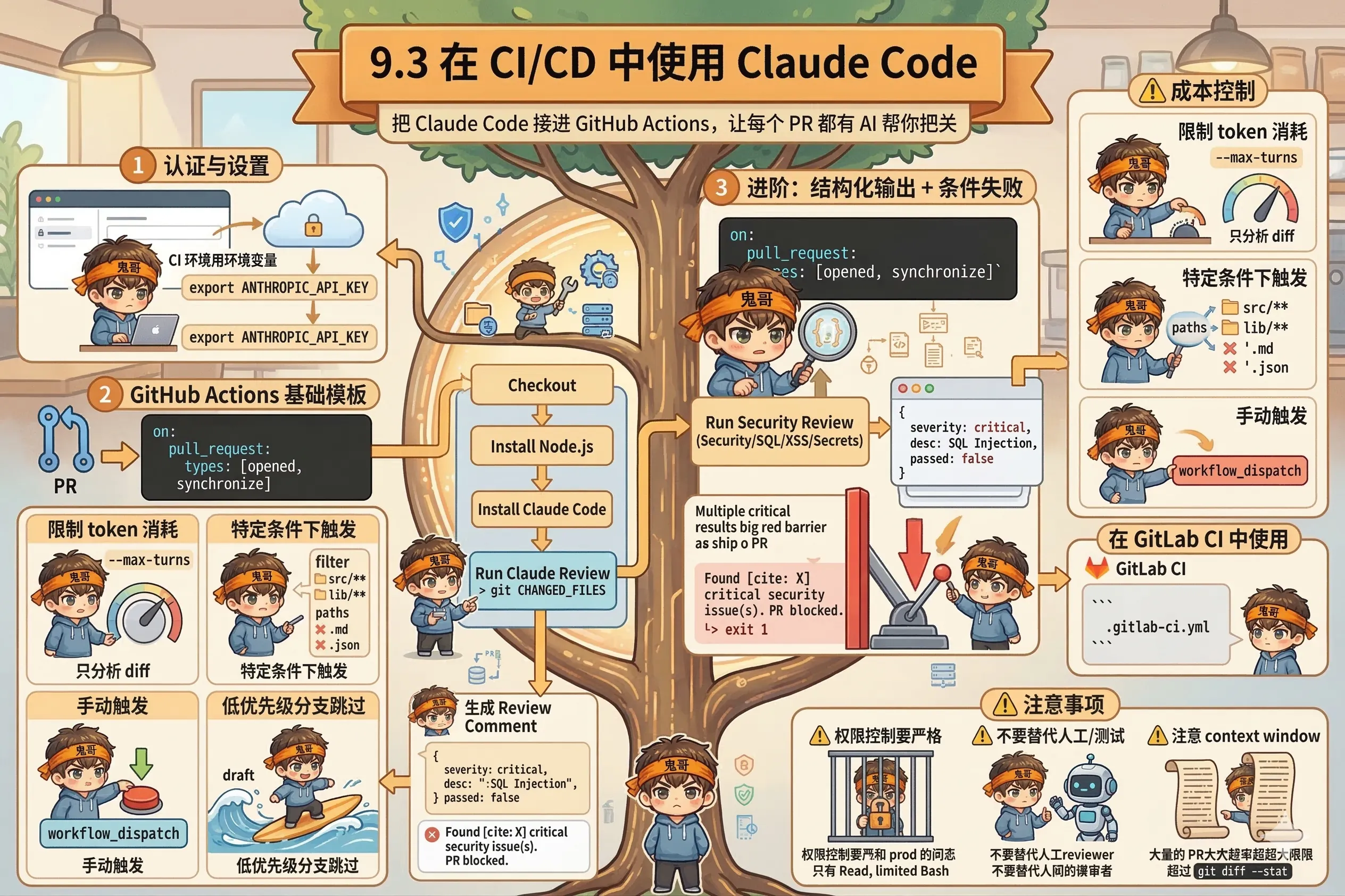
把 Claude Code 接进 GitHub Actions,让每个 PR 都有 AI 帮你把关。
人工 code review 有几个现实问题:
Claude Code 可以作为第一道关卡:每个 PR 提交时自动跑一遍,找出明显的 bug、安全问题、不符合规范的地方,生成 review comment——人类 reviewer 再在此基础上做判断。
本地开发用 claude auth login 走 OAuth,CI 环境用环境变量:
# CI 里设置环境变量
export ANTHROPIC_API_KEY="sk-ant-..."
Claude Code 会自动检测 ANTHROPIC_API_KEY,不需要任何额外的登录步骤。
在 GitHub Actions 里,把 API key 存在仓库 Secrets(Settings → Secrets → New repository secret),然后在 workflow 里引用:
env:
ANTHROPIC_API_KEY: ${{ secrets.ANTHROPIC_API_KEY }}# .github/workflows/claude-review.yml
name: Claude Code Review
on:
pull_request:
types: [opened, synchronize]
jobs:
claude-review:
runs-on: ubuntu-latest
permissions:
contents: read
pull-requests: write
steps:
- name: Checkout code
uses: actions/checkout@v4
with:
fetch-depth: 0 # 需要完整历史才能 diff
- name: Install Node.js
uses: actions/setup-node@v4
with:
node-version: '20'
- name: Install Claude Code
run: npm install -g @anthropic-ai/claude-code
- name: Run Claude Review
env:
ANTHROPIC_API_KEY: ${{ secrets.ANTHROPIC_API_KEY }}
run: |
# 获取 PR 的变更文件
CHANGED_FILES=$(git diff --name-only origin/${{ github.base_ref }}...HEAD)
# 让 Claude 审查变更
REVIEW=$(claude -p "Review the following changed files for bugs, security issues, and code quality.
Changed files: $CHANGED_FILES
Focus on the diff between origin/${{ github.base_ref }} and HEAD." \
--allowedTools "Read,Bash(git diff *)" \
--output-format json \
--max-turns 5 | jq -r '.result')
echo "$REVIEW"
- name: Post Review Comment
uses: actions/github-script@v7
with:
script: |
const review = process.env.CLAUDE_REVIEW;
github.rest.issues.createComment({
issue_number: context.issue.number,
owner: context.repo.owner,
repo: context.repo.repo,
body: `## 🤖 Claude Code Review\n\n${review}`
});
env:
CLAUDE_REVIEW: ${{ env.REVIEW }}更实用的版本——Claude 输出结构化报告,如果有 critical 问题就让 CI 失败:
- name: Run Claude Security Review
  env:
    ANTHROPIC_API_KEY: ${{ secrets.ANTHROPIC_API_KEY }}
  run: |
    SCHEMA='{
      "type": "object",
      "properties": {
        "issues": {
          "type": "array",
          "items": {
            "type": "object",
            "properties": {
              "severity": {"type": "string", "enum": ["critical", "warning", "info"]},
              "description": {"type": "string"},
              "file": {"type": "string"}
            }
          }
        },
        "passed": {"type": "boolean"}
      }
    }'

    RESPONSE=$(claude -p "Security review the changed files. Check for SQL injection, XSS, hardcoded secrets, and insecure dependencies." \
      --allowedTools "Read,Bash(git diff *)" \
      --output-format json \
      --json-schema "$SCHEMA" \
      --max-turns 5)

    # 提取结构化输出
    STRUCTURED=$(echo "$RESPONSE" | jq '.structured_output')
    CRITICAL_COUNT=$(echo "$STRUCTURED" | jq '[.issues[] | select(.severity == "critical")] | length')

    # 打印报告
    echo "$STRUCTURED" | jq -r '.issues[] | "[\(.severity | ascii_upcase)] \(.file): \(.description)"'

    # 如果有 critical 问题,让 CI 失败
    if [ "$CRITICAL_COUNT" -gt 0 ]; then
      echo "::error::Found $CRITICAL_COUNT critical security issue(s). PR blocked."
      exit 1
fiCI 里每个 PR 都跑 Claude,成本可能失控。几个控制手段:
1. 限制 token 消耗
# 限制最多跑 3 轮工具调用
claude -p "..." --max-turns 3

# 只分析 diff,不分析整个仓库
git diff origin/main...HEAD | claude -p "Review these specific changes"
2. 只在特定条件下触发
on:
  pull_request:
    types: [opened, synchronize]
    # 只在这些目录有变化时才触发
    paths:
      - 'src/**'
      - 'lib/**'
      # 忽略文档、配置文件
      - '!**.md'
      - '!**.json'
3. 手动触发(workflow_dispatch)
on:
  # 正常 PR 事件
  pull_request:
    types: [opened]
  # 也支持手动触发
  workflow_dispatch:
    inputs:
      pr_number:
        description: 'PR number to review'
        required: true
4. 给低优先级分支跳过
- name: Skip draft PRs
  if: github.event.pull_request.draft == false
run: claude -p "..."GitLab 同理,把 API key 存在 CI/CD Variables:
# .gitlab-ci.yml
claude-review:
  stage: review
  image: node:20
  before_script:
    - npm install -g @anthropic-ai/claude-code
  script:
    - |
      claude -p "Review the changes in this MR for bugs and code quality" \
        --allowedTools "Read,Bash(git diff *)" \
        --output-format json \
        --max-turns 4 | jq -r '.result'
  variables:
    ANTHROPIC_API_KEY: $ANTHROPIC_API_KEY  # 从 CI/CD Variables 取
  only:
- merge_requests权限控制要严格:CI 里的 Claude 绝对不能有写生产环境的权限。用 --allowedTools 明确白名单,只给 Read 和受限的 Bash 命令。
不要信任 Claude 的 CI 判断作为唯一门禁:Claude 可能漏报,也可能误报。把它当"辅助 reviewer",不要替代 CI 测试或人工 review。
注意 context window:大型 PR(几百个文件变更)可能超出 context window。用 git diff --stat 先做概要,再针对核心文件做深度分析。
claude -p + CI/CD 的组合,让 AI review 变成了每个项目都能用的标配。下一节,我们看 Python 和 TypeScript SDK,实现更完整的编程化控制 ↓