
看累了听个音乐吧
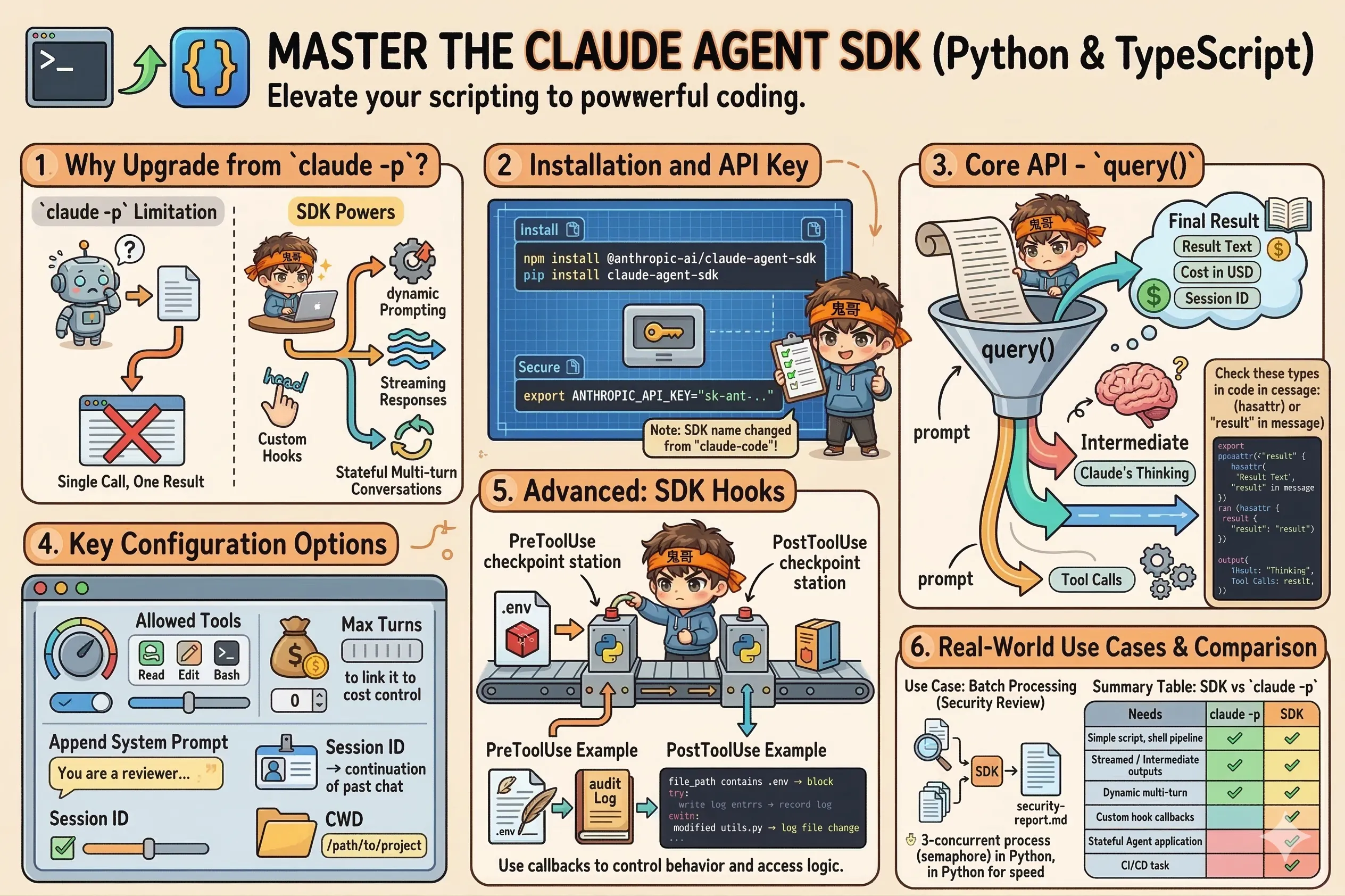
从命令行脚本升级到真正的编程——用代码驱动 Claude Code 的完整能力。
claude -p 已经很强了,但它有一个根本限制:只能调用一次,拿一个结果。如果你需要:
那你需要的是 Claude Agent SDK(以前叫 Claude Code SDK)。
包名变化:SDK 最近从
@anthropic-ai/claude-code改名为@anthropic-ai/claude-agent-sdk(Python 对应claude-agent-sdk)。功能完全一样,只是名字变了。
# TypeScript / JavaScript
npm install @anthropic-ai/claude-agent-sdk

# Python
pip install claude-agent-sdk
设置 API key:
export ANTHROPIC_API_KEY="sk-ant-..."SDK 的核心 API 是 query()——接收 prompt,返回一个异步迭代器,逐条产出消息。
TypeScript:
import { query } from "@anthropic-ai/claude-agent-sdk";

for await (const message of query({
  prompt: "Find and fix the bug in src/auth.js",
  options: {
    allowedTools: ["Read", "Edit", "Bash"]
  }
})) {
  // 每条消息都打印出来
  console.log(message);
}
Python:
import asyncio
from claude_agent_sdk import query, ClaudeAgentOptions

async def main():
    async for message in query(
        prompt="Find and fix the bug in src/auth.js",
        options=ClaudeAgentOptions(
            allowed_tools=["Read", "Edit", "Bash"]
        )
    ):
        print(message)

asyncio.run(main())query() 产出的消息有几种类型,用 hasattr(Python)或 "result" in message(TS)判断:
TypeScript:
import { query, ResultMessage, AssistantMessage } from "@anthropic-ai/claude-agent-sdk";

for await (const message of query({ prompt: "Summarize the project" })) {
  if ("result" in message) {
    // 最终结果
    console.log("Final result:", message.result);
    console.log("Cost:", message.cost_usd, "USD");
    console.log("Session:", message.session_id);
  } else if ("content" in message) {
    // 中间消息(Claude 的思考过程、工具调用等)
    console.log("Intermediate:", message.content);
  }
}
Python:
from claude_agent_sdk import query, ClaudeAgentOptions, ResultMessage

async for message in query(prompt="Summarize the project"):
    if hasattr(message, "result"):
        # 最终结果
        print(f"Result: {message.result}")
        print(f"Cost: ${message.cost_usd:.4f}")
    elif hasattr(message, "content"):
        # 中间消息
print(f"Thinking: {message.content}")const response = query({
prompt: "...",
options: {
// 允许的工具白名单
allowedTools: ["Read", "Bash(git *)", "Edit"],
// 最大对话轮次(控制成本)
maxTurns: 5,
// 追加 system prompt
appendSystemPrompt: "You are a security-focused reviewer. Be strict.",
// 续接上次会话
sessionId: "sess_abc123",
// 工作目录
cwd: "/path/to/project",
}
});SDK 里的 hook 不是 shell 命令,而是回调函数——更灵活,能直接访问 Python/TypeScript 的生态。
Python 示例:记录所有文件修改
import asyncio
from datetime import datetime
from claude_agent_sdk import query, ClaudeAgentOptions, HookMatcher

async def log_file_change(input_data, tool_use_id, context):
    file_path = input_data.get("tool_input", {}).get("file_path", "unknown")
    with open("./audit.log", "a") as f:
        f.write(f"{datetime.now()}: modified {file_path}\n")
    return {}  # 空 dict = 放行

async def block_env_files(input_data, tool_use_id, context):
    file_path = input_data.get("tool_input", {}).get("file_path", "")
    if ".env" in file_path:
        return {"decision": "block", "reason": "Cannot modify .env files"}
    return {}

async def main():
    async for message in query(
        prompt="Refactor utils.py for better readability",
        options=ClaudeAgentOptions(
            permission_mode="acceptEdits",
            hooks={
                "PostToolUse": [
                    HookMatcher(matcher="Edit|Write", hooks=[log_file_change])
                ],
                "PreToolUse": [
                    HookMatcher(matcher="Edit|Write", hooks=[block_env_files])
                ]
            }
        )
    ):
        if hasattr(message, "result"):
            print(message.result)

asyncio.run(main())场景:对 src/ 下的所有 JS 文件逐一做安全审查,汇总报告。
TypeScript 版本:
import { query } from "@anthropic-ai/claude-agent-sdk";
import { glob } from "glob";
import fs from "fs";

interface SecurityIssue {
  file: string;
  issues: string;
}

async function reviewFile(filePath: string): Promise<string> {
  let result = "";

  for await (const message of query({
    prompt: `Security review ${filePath}. Check for: SQL injection, XSS, hardcoded secrets, insecure dependencies. Be concise.`,
    options: {
      allowedTools: ["Read"],
      maxTurns: 2,
      cwd: process.cwd(),
    }
  })) {
    if ("result" in message) {
      result = message.result ?? "";
    }
  }

  return result;
}

async function main() {
  const files = await glob("src/**/*.js");
  const report: SecurityIssue[] = [];

  console.log(`Reviewing ${files.length} files...`);

  for (const file of files) {
    console.log(`  → ${file}`);
    const review = await reviewFile(file);
    report.push({ file, issues: review });
  }

  // 写入报告
  const reportMd = report
    .map(r => `## ${r.file}\n\n${r.issues}`)
    .join("\n\n---\n\n");

  fs.writeFileSync("security-report.md", `# Security Review\n\n${reportMd}`);
  console.log("Report saved to security-report.md");
}

main().catch(console.error);
Python 版本(并发提速):
import asyncio
import glob
from claude_agent_sdk import query, ClaudeAgentOptions

async def review_file(file_path: str) -> dict:
    result = ""
    async for message in query(
        prompt=f"Security review {file_path}. Check for SQL injection, XSS, hardcoded secrets. Be concise.",
        options=ClaudeAgentOptions(
            allowed_tools=["Read"],
            max_turns=2
        )
    ):
        if hasattr(message, "result") and message.result:
            result = message.result

    return {"file": file_path, "review": result}

async def main():
    files = glob.glob("src/**/*.py", recursive=True)
    print(f"Reviewing {len(files)} files...")

    # 并发审查(最多 3 个同时跑,避免超 rate limit)
    semaphore = asyncio.Semaphore(3)

    async def review_with_limit(f):
        async with semaphore:
            return await review_file(f)

    results = await asyncio.gather(*[review_with_limit(f) for f in files])

    # 写入报告
    with open("security-report.md", "w") as f:
        f.write("# Security Review Report\n\n")
        for r in results:
            f.write(f"## {r['file']}\n\n{r['review']}\n\n---\n\n")

    print("Report saved to security-report.md")

asyncio.run(main())claude -p? | 需求 | 推荐 |
|---|---|
| 简单脚本、shell pipeline | claude -p |
| 需要处理中间消息/流式输出 | SDK |
| 动态调整多轮对话逻辑 | SDK |
| 注册自定义 hook 回调 | SDK |
| 构建有状态的 Agent 应用 | SDK |
| CI/CD 一次性任务 | claude -p |
掌握了 SDK,下一节我们看最高阶的玩法——让多个 agent 协作分工,处理复杂任务 ↓